HOME
GODOT MULTIMESH TESTING
A two-part investigation of GPU instancing for dense foliage in Godot 4.
In July 2024 I wanted to know how to fill a large outdoor area with plants in Godot 4 without hurting the frame rate or the editor. Part 1 compares hand-placed scenes against a MultiMesh, which is Godot's node for GPU instancing, and part 2 uses MultiMeshes to build a forest big enough to walk around in.
PART 1: DESERT FARM
Hand-placed scenes vs. a MultiMesh
July 2024 · Godot 4.3 · Forward+
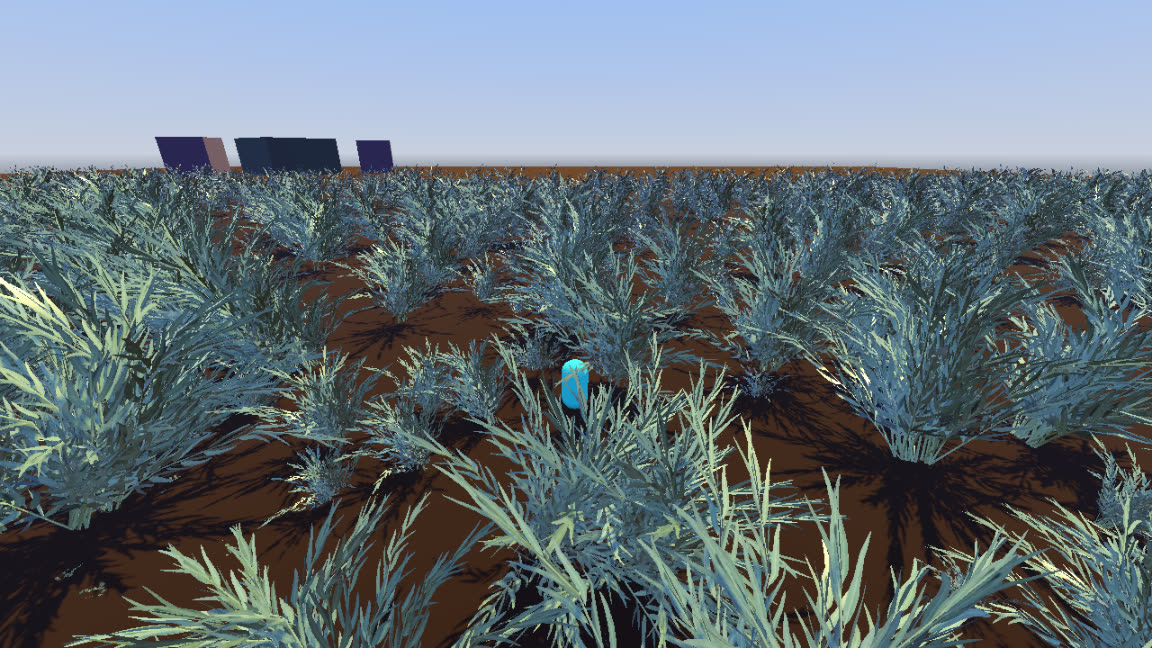
What I made
A test scene with a flat desert floor, a capsule player and three boxes on the horizon for scale. The scene stayed the same in both versions, so the only thing that changed was how the foliage got there.
How
For the first version I placed about ten copies of a Sketchfab flower bush by hand in one scene. I grouped six of those scenes into a bigger scene, repeated that nesting twice more to build one giant field and placed nine giant fields in a square around the player.
Average frame time went from about 10 ms to about 14 ms, with a few frames around 60 ms as the scene loaded. The editor lagged and crashed whenever I opened, closed or adjusted those nodes, so I deleted the field.
For the second version I used a MultiMeshInstance3D, which draws every copy of one mesh in a single instanced draw call. Its Populate Surface tool scattered 128 bushes over the same area with random scale, rotation and tilt, and I placed nine of those around the player as before. A MultiMesh holds one mesh, and the Sketchfab model kept its flowers and leaves as separate meshes, so the second field is leaves only and less dense.
| Stat | Hand-placed | MultiMesh |
|---|---|---|
| Objects | 96,005 | 23 |
| Primitives | 19,245,157 | 14,000 |
| Draw calls | 7 | 12 |
What I took away
The object count was what slowed things down. The hand-placed field only needed 7 draw calls because the renderer merged the identical bushes, but each of its 96,005 objects still had to be culled every frame and tracked by the editor.
The MultiMesh field cut that to 23 objects. Draw calls went from 7 to 12 because each of the nine MultiMeshInstance3D nodes is drawn separately. The primitive counts can't be compared directly, since the second field had fewer bushes and no flowers.
For anything that repeats by the hundreds, like grass, bushes or rocks, I now start with a MultiMesh. When a model is split into parts like these flowers and leaves, each part needs its own MultiMesh or the parts need to be merged before import.
NODES:
MultiMeshInstance3DCharacterBody3DWorldEnvironmentPART 2: MISTY FOREST
A forest built from one tiled scene
July 2024 · Godot 4 · Forward+
What I made
A 768 by 768 meter forest at night with fog, fireflies and mountains about a kilometer out on each side. I built it to see how the MultiMesh approach from part 1 holds up across an area big enough to explore.
How
The forest is made from one reusable scene I called a quad tile. A quad tile is four 64 meter ground tiles, and each ground tile has one MultiMeshInstance3D of 20 trees and another of 200 grass clumps. Each quad tile also has a GPUParticles3D node with 55 fireflies that drift on turbulence noise. I laid out 36 quad tiles in a 6 by 6 grid, which adds up to 2,880 trees, 28,800 grass clumps and 1,980 fireflies.
To keep the drawing cost limited to the area around the player, the trees use a visibility range. They stop drawing past 192 meters and fade out over the last 32 meters. The fireflies also stop at 192 meters.
Depth fog with a height falloff and volumetric fog hide the edge of that range. The volumetric fog is lit in patches by 42 yellow-green spot lights placed through the forest.
What I took away
Putting the MultiMeshes inside one tile scene made the world easy to change. I tuned density, fog and lighting once in the quad tile and all 36 copies picked it up, and making the world bigger only means placing more tiles.
Visibility ranges depend on the fog. The range sets how much of the forest gets drawn, and the fog has to be thick enough at that distance to hide where the trees stop, so the two values have to be tuned together.
This is not world streaming yet. All 36 tiles stay loaded and visibility ranges only skip drawing them, and the grass has no range at all. A larger world would need a shorter range for the grass and tile scenes that load in and out by distance from the player.