nonelectric-engine architecture (internal)
This guide is for people changing the engine. People using it should read the developer guide.
What this is and where it came from
The engine is four small pieces lifted out of eelipets, the pet game in the electriceeli.com repository. In eelipets each piece was tied to one game: its storage keys, its Preact islands, its pet. Here each is general, and anything about one particular game is left to the game.
| Engine piece | Taken from (electriceeli.com origin/main) |
What was kept | What was left in eelipets |
|---|---|---|---|
src/dialogue.js |
src/utils/data/digipet_clicker_rpg/story.ts and tale.ts, src/islands/digipet_clicker_rpg/story-modal.tsx |
Choices behind when conditions (flag, any, all). Flags set by choices. The open page saved so a reload lands on it. Checking saved data against the script on load. |
Chapters, endings and the tale cast. Need and stat checks (leans), dexterity games and {name} references. The game’s own conditions now go through check. |
src/stage.js |
TravelFade in src/islands/digipet_clicker_rpg/scene-menu.tsx and .travel-fade in src/styles/eelipets.css |
Fade to dark, show the place’s name, swap the scene while it’s dark, fade back. Instant with reduced motion. | The fixed 2.4 s keyframes, the farm and city art, the travel confirm dialog |
src/clock.js |
gameInFront() in src/utils/stat-mechanics.ts, and the gated setIntervals in vitals.tsx and game-metadata.tsx |
Nothing moves unless the page is showing and focused. There’s no catching up on time away. | Needs draining, encounter pacing and play-time counting, which are all users of the clock |
src/save.js |
src/utils/data/digipet_clicker_rpg/save.ts |
Never crash on a hand-edited save. Parse field by field. A versioned shape. | Run keys versus global keys, merging on import, gold as earned and spent totals, legacy key moves |
eelipets hasn’t been moved onto the engine. Doing that is a separate change in electriceeli.com.
Shape

The four pieces never import each other. src/index.js only re-exports them. Keep it that way: it lets a game use one piece without the others. For example, a Preact game can use dialogue and save but draw its own transitions.
Rules that keep it working
- Everything worth saving is plain data owned by the game. Dialogue state is
{ at, flags }, clock time is a number, and the scene is a string. The engine never saves on its own behalf. Saving everything in one object is what lets a game resume mid-conversation without the engine knowing about saves. - The dialogue is pure.
viewandchoosetake a state and return a new one. They read nothing else and change nothing. That’s why tests need no DOM, and why “what would the player see on load” is justview(resume(saved)). - Flags are set when a node is entered, not when it’s drawn.
beginandchoosecallenter, which adds the node’ssetflags. Drawing the same line twice, for example after a reload, can’t apply them twice. - Choice indexes are positions in the node, not on screen.
viewfilters choices but keeps each one’s originalindex. A save or a test that says “choice 3” means the same choice whatever is hidden. - Everything read from storage is untrusted.
createSave.loadswallows every error and returnsnull.dialogue.resumefalls back tobegin()if the saved node isn’t in the script anymore, which happens when a script is edited after players have saved. A game’sparsechecks its own fields. - Errors in the script are thrown at creation.
createDialoguechecks everytoandnexttarget, so a broken script fails at load, not three choices in. - The clock only counts real play. Each tick measures real time since the last one and adds at most
MAX_STEP_MS(1 s), and only whilerunning()is true. Timers fire in deadline order, with ties going to the one set first. A callback may add or cancel timers. - The stage swaps only while the screen is dark. The old scene’s cleanup runs,
rootis emptied, and the new scene draws while the veil is fully opaque.gocalls are queued, so two quick clicks can’t draw two scenes over each other.
Saving and resuming mid-conversation
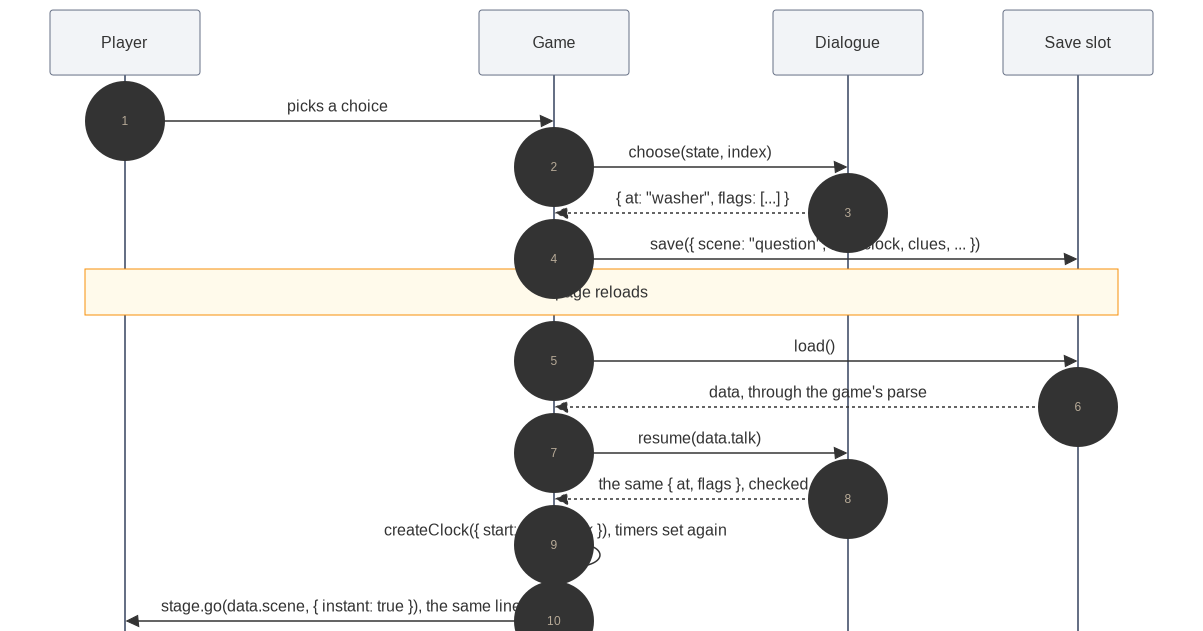
Choices made, and why
- JavaScript with a hand-written
index.d.ts, no build. The browser runssrc/directly, the examples need only a static server, and Astro and Vite take ES modules as they are. The cost is that the types and the code have to be kept in step by hand. The API is small, so that’s cheap. Revisit if the API grows past what fits in one.d.tsfile. - No framework. eelipets used Preact signals. The engine takes and returns plain values, so any view layer can hold them.
- No typing effect, text references or audio. eelipets has a typewriter (
typing.ts) and{id}name references. Both are presentation, and a game can do them when it draws a line. Add them only if a second game needs the same thing. - One save slot per
createSave. eelipets splits run saves from global saves using lists of keys. A game that needs that makes two slots. - The veil’s style is inline. The engine ships no CSS file, so it works with no setup. Games restyle it through
.ne-veiland.ne-veil-title.
Testing
npm testrunstest/engine.test.jswithnode --test. It covers dialogue, clock and save. It uses the parlour’s own script, so editing that script can break a test on purpose.- The stage needs a real browser. Check it by running
npm startand playingexamples/parlour/. The full path is: look at all three objects and pocket the washer (the mantel picture changes), question him, reload mid-questioning, get the confession, accuse him, and get “Case closed” with the music box back on the mantel. Then load with?minutes=0.25and let the train leave. Also check that the countdown says “(paused)” in a background tab. examples/hello/index.htmlis copied word for word into the guide’s quick start. Change both together.
Known limits
savecan throw when storage is full. The engine lets that error through, because only the game knows whether to warn the player or retry.inFront()usesdocument.hasFocus(). A page in an iframe that doesn’t have focus reads as not in front. Pass a differentrunningcheck if that’s wrong for your game.- Timer callbacks are kept in memory only. Games save deadlines as numbers and set the timers again on load (see the parlour’s
trainAt).
Sprite toolkit
The sprite toolkit is an optional developer tool for pixel art. It lives in sprite/ and is described for users in sprites.md. It came from the eelipets sprite toolkit, using the portable snapshot of sprite-toolkit/shared/ that was handed over with the task. That folder isn’t on electriceeli.com’s origin/main, so the snapshot was the only source.
| Here | From sprite-toolkit/shared/ |
Changes |
|---|---|---|
sprite/drawing.js |
drawing.ts |
Ported to JavaScript. Added rect, and a size check in canvas. |
sprite/recipe.js |
generator.ts, validation.ts, outputs.ts, approval.ts |
Merged into one file, since each was a few lines. validateFrame throws on an unknown rule name. planOutputs also rejects absolute paths. The generator’s target was dropped: a sprite file lists its own rules. |
sprite/browser.js |
browser.ts |
toCanvas is now exported, for the preview |
sprite/png-node.js |
png-node.ts |
decode rejects files that aren’t PNGs |
sprite/cli.js |
new; the idea is from scripts/sprite-toolkit-check.ts |
check and approve in one command |
Where the line falls
| Owner | Responsible for |
|---|---|
sprite/index.js (shared) |
pixel buffers, masks, seeded choices, validation, export planning, pixel comparison |
sprite/cli.js (Node) |
loading a sprite file, planning and validating everything, then writing (approve) or comparing (check) |
examples/parlour/sprites.html (development only) |
seed, settings, captions, rule results, and the approved PNG beside each state. It prints the approve command and never writes. |
examples/parlour/art/mantel.js (the game) |
the art, palette, rules, state IDs and filenames |
examples/parlour/game.js (the game) |
which PNG to show, worked out from the save |
src/ (engine runtime) |
nothing: it never imports sprite/ |
test/sprite.test.js enforces the last row. It follows every static import from examples/parlour/game.js and fails if any reaches sprite/ or art/. I also checked it in Chrome’s network log: the game page loads only src/*.js, its own files, and images/mantel-*.png.
The mantel in the Quiet Parlour
- The three states are
washer,takenandrestored. They’re never saved.game.jsworks them out from facts already in the save. The washer clue ingame.cluesgivestakeninstead ofwasher. A “Case closed” verdict (verdict(...).solved) showsrestoredon the ending. - The pick-up. The washer used to be collected just by looking at the mantel. Now it takes a separate “Pocket the felt washer” button, the
takefield onROOM.mantelinstory.js, so picking it up is what changes the picture. - Old saves still work. A save that already has the washer in its clues shows
taken. The save shape and version didn’t change. - Alt text comes from
MANTELinstory.js, the player’s words, not from the recipe’s captions, which are for developers. The game never imports the recipe.
Maintenance
- Changing the art: edit
art/mantel.js, look at it in the preview, then runnpm run sprites -- --approve --seed N. Commit the recipe,mantel.approved.jsonandimages/mantel-*.pngtogether.npm testfails until they agree. - Adding a state: add it to
STATESinart/mantel.js(it’s added tooutputsautomatically), approve, then add its words toMANTELinstory.jsand its condition ingame.js. - Renaming a caption changes nothing outside the recipe. Renaming an ID renames a file, so update
game.jstoo. - Approving the same seed and settings again writes the same bytes.
test/sprite.test.jschecks this. - Command name: inside this repo the command runs as
npm run spritesornode sprite/cli.js. Thenonelectric-spritesname inbinonly exists once another project installs the packed archive. In a scratch project that installednonelectric-engine-0.1.0.tgzas a dev dependency,npx nonelectric-spritesapproved and checked the guide’s drawer recipe.
Distribution
The engine is private and never published to a registry. Each version goes to a game as an npm pack archive, which the game commits under vendor/ and installs with npm ci. The workflow, and what an archive exposes, are in install.md. Anything added to files in package.json ends up in every game repo that commits an archive, so check npm pack --dry-run whenever files changes.