Sprite toolkit guide
The sprite toolkit is an optional developer tool for pixel art. It works in three steps:
- You write a recipe: a small script that draws a prop from a seed and a few settings.
- You look at the results in a preview page, pick the version you like, and approve it. Approving writes the prop’s PNGs into your game’s assets.
- From then on, a check redraws the recipe and fails if a committed PNG no longer matches.
Your game only ever loads the approved PNGs. It never runs the recipe, and players never download the toolkit.

- What you need
- Your first recipe
- Preview, approve, check
- When a check fails
- Showing the right state in your game
- API reference
What you need
You need Node 22 or newer, and the engine installed in your project from a packed archive. A project that only makes art installs it as a dev dependency. Installing the engine in a game has the commands. The toolkit has three entry points, kept apart so browser code never pulls in Node code:
| Import | Runs in | Holds |
|---|---|---|
nonelectric-engine/sprite |
browser and Node | drawing, recipes, validation, export planning, pixel comparison |
nonelectric-engine/sprite/browser |
browser | load a PNG into pixels, draw pixels to a canvas |
nonelectric-engine/sprite/node |
Node | PNG encode and decode |
The command is nonelectric-sprites. In a game that has installed the engine archive, run it with npx nonelectric-sprites <sprite file>, or as nonelectric-sprites <sprite file> inside an npm script. In the engine repo, npm run sprites runs it for the example.
If you only want the engine, ignore all of this. nonelectric-engine on its own never imports the toolkit.
Your first recipe
A sprite file is a module whose default export tells the command four things: what to draw, which rules every frame must pass, where the approved choice is kept, and which file each frame becomes.
// art/drawer.js
import { canvas, rect, resolve, offPalette } from "nonelectric-engine/sprite";

const PALETTE = new Set(["#694833", "#4a3222", "#e2b565", "#babec1", "#272729", "#e8e2ce"]);
const controls = [{ key: "handle", label: "Handle", options: ["brass", "silver"] }];

// stable IDs: filenames and game states point at these, so they never change. Labels are free to.
const STATES = { closed: "Drawer, shut", open: "Drawer, open with the letter inside", empty: "Drawer, open and empty" };

export const generator = {
  title: "Desk drawer",
  blurb: "The drawer before and after the letter is taken.",
  controls,
  draw(seed, settings) {
    const params = resolve(controls, seed, settings); // fills any "random" setting from the seed
    const handle = params.handle === "brass" ? "#e2b565" : "#babec1";
    const frames = Object.entries(STATES).map(([id, label]) => {
      const pic = canvas(12, 8);
      pic.shape(rect(1, 1, 11, 7), "#694833", "#4a3222"); // fill, then a one-pixel outline
      if (id === "closed") pic.stamp(["hh"], 5, 4, { h: handle });
      else pic.stamp(["iiiiiiii", id === "open" ? "iieeiiii" : "iiiiiiii"], 2, 2, { i: "#272729", e: "#e8e2ce" });
      return { id, label, w: pic.w, h: pic.h, px: pic.px, problems: [] };
    });
    return { params, frames };
  },
};

export default {
  generator,
  rules: {
    palette: { about: "uses only the game's palette", check: (f) => (offPalette(f.px, PALETTE).length ? `off-palette ${offPalette(f.px, PALETTE)}` : null) },
  },
  validate: ["palette"],
  approved: new URL("./drawer.approved.json", import.meta.url), // written by --approve
  root: new URL("../public/", import.meta.url), // your game's asset folder
  outputs: Object.keys(STATES).map((id) => ({ frame: id, file: `props/drawer-${id}.png` })),
};
Some rules to keep in mind:
- Same seed, same pixels. Use
rng(seed)from the toolkit for any randomness, neverMath.random. The check depends on a recipe drawing the same thing every time. - IDs are the contract. Output files and your game’s states point at frame
ids. Renaming alabelor reordering the frames changes no filename. - Colours are lowercase
"#rrggbb", ornullfor see-through.
Then approve the first version. In the game repo:
npx nonelectric-sprites art/drawer.js --approve --seed 1Preview, approve, check
Preview
The example’s preview is examples/parlour/sprites.html. In the engine repo, run npm start and open http://localhost:4600/examples/parlour/sprites.html.
It shows each state twice, as this version beside the approved PNG. Each state lists its frame ID, its caption, the file it becomes, whether it differs from the approved file, and every rule it fails. Change the seed or a setting and everything redraws. The URL keeps your choice, so you can reload it or share it.
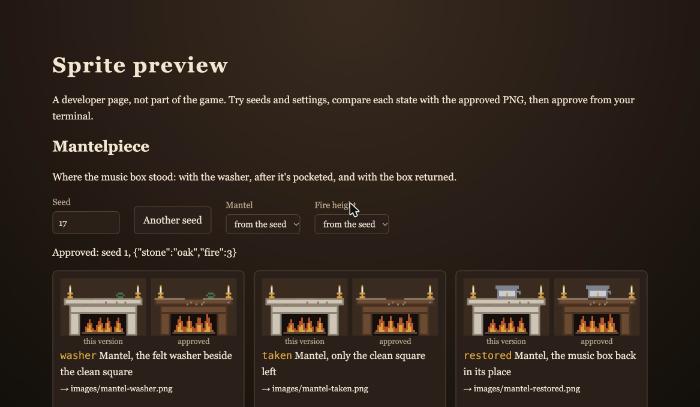
The page is a developer tool. The game never links to it or loads it. To make one for your own game, copy sprites.html and sprites.js, point the import at your sprite file, and change the engine imports to nonelectric-engine/sprite and nonelectric-engine/sprite/browser. Those need a bundler or an import map in the browser.
Approve
Approving writes files, so it’s a terminal command and never a button on the page. The preview prints the exact command for what’s on screen.
For the example, in the engine repo:
npm run sprites -- --approve --seed 17 --set stone=marble --set fire=2The same in a game repo, for its own sprite file:
npx nonelectric-sprites art/drawer.js --approve --seed 17 --set handle=brassWhat approving does:
- Draws every state and checks every rule, and checks the output plan for missing IDs, repeated files, and paths that leave the asset folder. If anything fails, it lists every problem and writes nothing.
- Writes each PNG beside its target as
<file>.draft, then moves them all into place. A failed write leaves the old art whole. - Writes the approved recipe to the
approvedfile as{ "seed": 17, "settings": { ... } }, with every setting filled in.
Approving the same seed and settings again writes byte-identical files. Commit the recipe, the approved JSON and the PNGs together.
Check
In the game repo:
npx nonelectric-sprites art/drawer.jsThe check redraws the approved recipe and compares it with each PNG by size and by pixels. It never compares bytes, so a PNG optimizer can’t break it. It writes nothing. If anything differs, it exits with code 1, so put it in your test command. This repo runs it in npm test.
You can add --seed and --set to a check to see what a candidate would change, without approving it. --root <dir> checks a copy of the asset folder instead of the real one.
When a check fails
These are real outputs from the example.
A committed PNG was edited by hand, or the recipe changed:
examples/parlour/art/mantel.js: 2 approved files don't match
images/mantel-taken.png: 1 pixel differs from what the recipe draws
images/mantel-restored.png: missing (expected at /tmp/x/images/mantel-restored.png); run with --approve to write it
Either undo the change, or re-approve if the new art is what you want.
A frame breaks a rule during approval:
art/mantel.js: 1 validation problem, nothing written
images/mantel-taken.png (taken): [palette] off-palette colours #ff00ff
Nothing approved yet:
examples/parlour/art/mantel.approved.json is missing: nothing is approved yet. Pick a seed in the preview, then run with --approve.A size change reads expected 48×32, found 2×2. A plan problem reads duplicate output: props/a.png, props/b.png requires the missing frame, or expected a relative output path: ../escape.png. Approval refuses all of these before writing anything.
Showing the right state in your game
Work out which state to show from facts your game already saves. Don’t save the state itself. Then load the PNG like any other image, and give it a text description from your game’s own words:
const state = game.clues.includes("washer") ? "taken" : "washer";
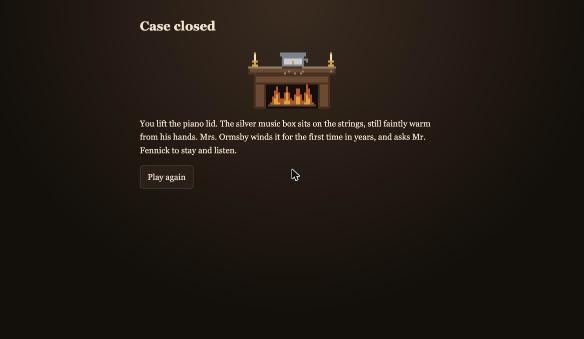
h("img", { src: `images/mantel-${state}.png`, width: 48, height: 32, alt: MANTEL[state] });img.mantel { width: 192px; image-rendering: pixelated; } /* 4x, crisp */Keep a keyboard action and a text description for anything the player has to notice, so nobody needs to see the picture to solve the game. The Quiet Parlour shows the mantel in the room and on the solved ending. “Pocket the felt washer” is a real button, and each picture’s alt text says what’s on the mantel.
API reference
Drawing (nonelectric-engine/sprite)
| Function | What it does |
|---|---|
canvas(w, h?, brush?) |
A blank w × h picture. shape(mask, fill, line, brush?) fills a mask and outlines it. stamp(rows, x, y, palette) paints characters as colours, and . leaves the pixel under it alone. |
rect, oval, tri, blob, along |
Masks for a box, an ellipse, a triangle, a lumpy ellipse, and a tube along a curve |
or, and, not, both |
Combine masks. both mirrors one across the middle. |
rng(seed) |
A seeded random from 0 to 1 |
wobble(seed) |
A smooth seeded wiggle from -1 to 1 |
widthOf(px, w), offPalette(px, set) |
Measurements for writing rules |
A brush sets the outline: width(x, y) for 1 or 2 pixels, heavyBottom, bleed (no outline where a shape runs off the edge), and box to clip a shape.
Recipes and checking (nonelectric-engine/sprite)
| Function | What it does |
|---|---|
resolve(controls, seed, settings) |
Fills each setting that’s missing or "random" from the seed. Each control has its own random stream, so changing one doesn’t reshuffle the others. |
validateFrame(frame, rules, specs) |
Runs the named rules and returns every failure as "[name] message". A spec is "name", or ["name", number] for a rule that takes an argument. |
planOutputs(frames, outputs) |
Pairs each { frame, file } with its frame and returns [file, frame] pairs. It throws on duplicate IDs, a repeated file, a non-relative path, or a missing frame. Preview-only frames can’t be exported. |
comparePicture(drawn, approved) |
Compares size, then pixels. Returns null when they match, otherwise a message. |
A control is { key, label, options: [...] } or { key, label, min, max, step }. A frame is { id, label, w, h, px, problems, preview? }. A sprite file’s default export is { generator, rules?, validate?, approved, root, outputs }. All of these are typed in sprite/index.d.ts.
Browser (nonelectric-engine/sprite/browser)
| Function | What it does |
|---|---|
load(url) |
Fetches a PNG and returns its pixels. Pixels under half opaque count as see-through, and colours are read as stored, with no colour correction. |
toCanvas(picture) |
A canvas at the picture’s own size, to scale up in CSS |
imageData, dataUrl, download, pixelHash |
Conversions, and a pixel fingerprint that matches the Node one |
Node (nonelectric-engine/sprite/node)
| Function | What it does |
|---|---|
encode(picture) |
Makes an 8-bit PNG: RGBA if any pixel is see-through, otherwise RGB |
decode(buffer) |
Reads 8-bit RGB or RGBA, non-interlaced PNGs. Anything else throws, so use a full image library for other kinds of PNG. |
pixelHash(px) |
A sha256 of the colours only, so pin the size separately |