nonelectric-engine developer guide
nonelectric-engine is a small browser runtime for story games. It gives you four things and nothing else:
| Piece | What it does |
|---|---|
Dialogue (createDialogue) |
Runs a branching conversation written as data. Choices can hide behind conditions and set flags. |
Stage (createStage) |
Swaps scenes behind a fade to dark, with an optional title card. |
Clock (createClock) |
A game clock that only moves while the page is showing and focused, with timers on it. |
Save (createSave) |
One versioned save slot in localStorage that never crashes on bad data. |
Your game keeps its own rules: clues, stats, inventory, what a choice costs. The engine has no idea what your game is about, and it never draws anything except the fade.
It’s plain JavaScript ES modules with TypeScript types. It has no dependencies and no build step, and doesn’t need a framework. It works the same on a plain HTML page, in Vite, or in Astro.
It’s a private engine. It’s never published to a registry. A game installs a version from a .tgz archive made with npm pack. Installing the engine in a game covers packing, installing, upgrading and what stays private.
- Quick start
- How the pieces fit
- API reference
- Worked example: The Quiet Parlour
- Using it from Astro or a bundler
- Installing the engine in a game, a separate guide
For pixel art, there’s an optional sprite toolkit. It’s separate from the runtime, and games that don’t use it never load it.
Quick start
You need Node 22 or newer, and access to the private engine repository. In the engine repo:
git clone https://github.com/electriceeli/nonelectric-engine.git
cd nonelectric-engine
npm start
npm start serves the repo at http://localhost:4600, because browsers won’t load ES modules from a file:// URL. Then open:
http://localhost:4600/examples/hello/: the smallest game, belowhttp://localhost:4600/examples/parlour/: the full example mystery
This is the whole of examples/hello/index.html. An owl asks who you are, remembers your answer across a reload, and fades between lines:
<!doctype html>
<html lang="en">
  <body>
    <main id="stage"></main>
    <script type="module">
      import { createDialogue, createSave, createStage } from "../../src/index.js";

      const talk = createDialogue({
        start: "hi",
        nodes: {
          hi: { speaker: "Owl", text: "Who goes there?", choices: [{ label: "A friend.", to: "friend", set: ["polite"] }, { label: "None of your business.", to: "rude" }] },
          friend: { speaker: "Owl", text: "Then come in. Reload the page: I'll remember you.", next: "hi" },
          rude: { speaker: "Owl", text: "Hoo. Suit yourself.", next: "hi" },
        },
      });
      const store = createSave({ key: "hello", parse: (data) => talk.resume(data) });
      let state = store.load() ?? talk.begin();

      const stage = createStage(document.getElementById("stage"), {
        scenes: {
          talk(root) {
            const line = talk.view(state);
            root.innerHTML = `<p><b>${line.speaker}:</b> ${line.text}</p>`;
            for (const choice of line.choices) {
              const button = document.createElement("button");
              button.textContent = choice.label;
              button.onclick = () => {
                state = talk.choose(state, choice.index);
                store.save(state);
                stage.go("talk", { title: "Later..." });
              };
              root.append(button);
            }
          },
        },
      });
      stage.go("talk", { instant: true });
    </script>
  </body>
</html>
Click “A friend.”, then reload. The owl picks up on the same line.
Run the tests with npm test.
How the pieces fit
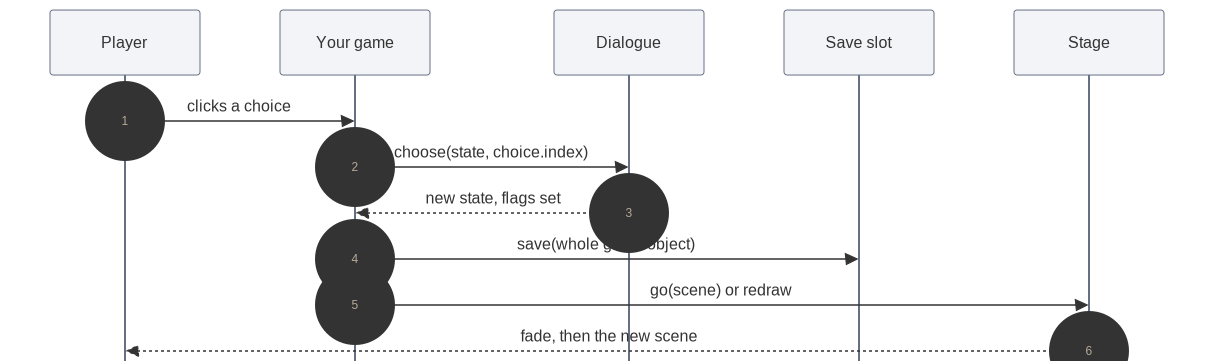
The engine keeps no hidden state that matters for a save. A dialogue’s position is a small object, { at, flags }. The clock’s time is a number. The current scene is a string. Your game puts those into one object along with its own data and hands it to the save slot. Loading puts each piece back.

The usual loop, on every player action:
API reference
Everything is imported from the package root:
import { createDialogue, createStage, createClock, inFront, createSave } from "nonelectric-engine";Types are in src/index.d.ts.
createDialogue(script, { check }?)
This makes a dialogue runner for one script. It checks the script up front and throws if the start node or any to or next target is missing, so a typo fails at load rather than mid-game.
Script shape
{
  start: "hello",                 // first node
  nodes: {
    hello: {
      speaker: "Mr. Fennick",       // optional
      text: "Good evening.",
      set: ["met"],                 // optional: flags set when the player arrives here
      next: "hub",                  // a node with no choices: one Continue choice leads here
      continue: "Go on",            // optional label for that Continue
    },
    hub: {
      text: "Anything else?",
      choices: [
        { label: "Ask about the tea", to: "tea", when: { clue: "tea" }, set: ["asked-tea"] },
        { label: "Leave", to: "hub", leave: true },   // extra fields are yours: they come back in view()
      ],
    },
    tea: { text: "I let it cool." },  // no choices and no next: the conversation ends here
  },
}
Conditions (when)
| Shape | Holds when |
|---|---|
{ flag: "x" } |
flag x has been set |
{ not: cond } |
cond doesn’t hold |
{ all: [...] } |
every condition holds |
{ any: [...] } |
at least one holds |
| anything else | your check(cond, state) returns true |
Use check for your game’s own rules, such as { clue: "tea" } or { stat: "luck", atLeast: 3 }. Without a check, an unknown condition throws.
Methods. Every method returns a new state and never changes the one you pass in.
| Method | Returns |
|---|---|
begin(at?) |
a fresh state at start (or at), with that node’s flags set |
view(state) |
{ id, speaker, text, choices, end }. choices holds only the open ones, each with an index. end is true when there are none. |
choose(state, index) |
the state after picking the choice with that index. It throws if that choice isn’t open. |
resume(saved) |
a safe state from untrusted data: a valid saved state as is, otherwise begin() |
holds(cond, state) |
whether a condition holds, the same test view uses |
Pass choice.index to choose, not the button’s position on screen. Hidden choices don’t shift the numbering.
text comes back as written. If you want {name}-style references, fill them in when you draw the line.
createStage(root, { scenes, fadeMs?, holdMs?, color? })
This makes a stage that draws one scene at a time into root.
scenes: an object of scene functions,(root, data) => cleanup?. A scene draws intoroothowever it likes, with DOM calls,innerHTML, or by mounting a component. It may return a cleanup function, which runs before the next scene is drawn.fadeMs(400): how long the fade in and the fade out each take.holdMs(700): how long a title stays on the dark screen.color("#000"): the colour of the fade.
| Member | What it does |
|---|---|
go(id, { title?, data?, instant? }) |
Fades to dark, shows title if given, empties root, draws scene id with data, then fades back. It returns a promise that settles when the fade is over. instant: true swaps with no fade, which is right for loading a save or redrawing in place. |
current |
the id of the scene on screen, or null |
- Overlapping calls: a
gomade while another is still fading waits its turn. - Input: the dark screen covers the page, so clicks can’t land mid-fade.
- Reduced motion: if the player has turned on reduced motion, every
gois instant. - Unknown scene:
gothrows for a scene id it doesn’t know. - Styling: the fade is a
div.ne-veiland the title is aspan.ne-veil-title, so you can restyle them from your CSS.
createClock({ start?, tickMs?, running? })
This makes a clock that counts milliseconds of play, meaning only the time the game was actually in front of the player.
start(0): where to start counting. Pass in the number you saved.tickMs(100): how often it checks the real time.0means it never ticks on its own, and you move it withadvance. That’s useful in tests.running(inFront): it only counts while this returns true. The default is the page showing and focused. Pass your own to pause too, for example() => inFront() && !menuOpen.
| Method | What it does |
|---|---|
now() |
milliseconds of play so far. Save this number. |
at(time, fn) |
runs fn(now) once the clock reaches time. It returns a cancel function. |
after(ms, fn) |
at(now() + ms, fn) |
every(ms, fn) |
runs fn every ms of play. It returns a cancel function. |
advance(ms) |
moves the clock on by hand, firing whatever comes due, earliest first |
stop() |
stops ticking and cancels every timer |
- Saving a timer: callbacks can’t be saved. Save the deadline as a number instead, for example
trainAt: 240000. When you load, callclock.at(saved.trainAt, fn)again. - Sleep and throttling: one tick never adds more than a second. A laptop waking up with the tab showing doesn’t skip a timer ahead. Neither does a throttled background tick.
inFront(): the defaultrunningcheck, exported so you can combine it with your own.
createSave({ key, version?, parse?, migrate?, storage? })
This makes one save slot. It’s stored as { version, savedAt, data } under key.
version(1): the shape version of your save. Raise it when the shape changes.parse(data): turns stored data into what your game uses. Anyone can editlocalStorage, so check every field here and fix or drop what’s wrong. Returningnullmeans there’s no usable save.migrate(data, fromVersion): upgrades an older save. Without it, an older save reads as no save.storage(localStorage): anything withgetItem,setItemandremoveItem. UsesessionStoragehere, or a stand-in in tests.
| Method | What it does |
|---|---|
load() |
your parsed data, or null |
save(data) |
writes data, which must be plain JSON. It can throw if storage is full. |
clear() |
deletes the save |
load() never throws. Broken JSON reads as null, and so does a save from a newer version, or a parse or migrate that throws. A newer save is left in storage until you save over it.
Worked example: The Quiet Parlour
examples/parlour/ is a complete one-room mystery that uses every piece. A silver music box has gone missing from a mantel. You look around the parlour for clues and question the one guest who was there, Mr. Fennick, before his train leaves. Then you accuse someone.
Run npm start and open http://localhost:4600/examples/parlour/. Add ?minutes=0.25 to the address to make the train leave after 15 seconds.
| File | Holds |
|---|---|
story.js |
the words: the room’s objects, the questioning script, the suspects and the verdict rule |
game.js |
the rules and the drawing |
index.html, style.css |
the page |
1. The questioning is a script with the game’s own conditions
The script in story.js is plain data. The questions that need evidence use a condition the engine doesn’t know, { clue: "tea" }. Each one also hides again once it has been asked:
const ask = (clue, label, to) => ({ label, to, when: { all: [{ clue }, { not: { flag: `asked-${clue}` } }] } });game.js answers clue conditions from the clues it has found:
const talk = createDialogue(QUESTIONING, { check: (cond) => game.clues.includes(cond.clue) });Clues belong to the game, because you find them in the room, outside any conversation. Flags belong to the dialogue, because they’re set by what you say. The confession only opens once Mr. Fennick has admitted touching the mantel, which is the flag admitted-mantel, and you have also found the piano clue.
2. One plain object is the whole save
const fresh = () => ({ scene: "room", clock: 0, trainAt: TRAIN_MS, clues: [], looked: null, talk: null, gone: false, accused: null });talk is the dialogue state, { at, flags }. clock is clock.now(). scene is the stage’s scene. The game saves after every action, every second of play, and on pagehide:
const persist = () => {
  game.clock = clock?.now() ?? game.clock;
  store.save(game);
};
clock.every(1000, persist);
3. Loading checks everything
parse rebuilds the save field by field. It keeps only known clues and a known scene, and it hands the dialogue part to talk.resume, which falls back to the start if the node no longer exists:
talk: d.talk ? talk.resume(d.talk) : null,4. Resuming halfway through the questioning
On load, the game rebuilds the clock from the saved time and sets the train timer again. Then it draws the saved scene with no fade:
game = store.load();
if (game) {
  startClock();                               // createClock({ start: game.clock }) + clock.at(game.trainAt, trainLeaves)
  stage.go(game.scene, { instant: true });
}
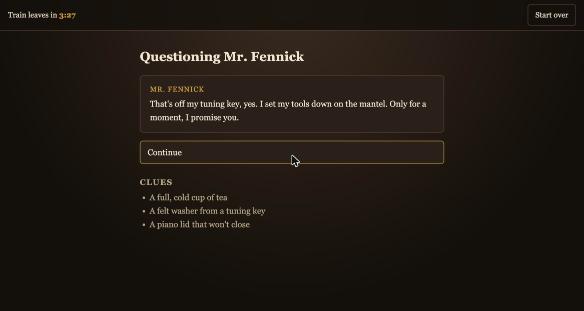
Pocket the felt washer from the mantel, ask Mr. Fennick about it, and reload. You’ll see his answer again, with the same Continue button, the same clues and the same time left on the train.
5. The train only leaves while you’re playing
The train is a clock timer, clock.at(game.trainAt, trainLeaves). Switch to another tab and the countdown in the corner says “(paused)” and stops. When it runs out, Mr. Fennick leaves, the questioning closes, and the stage fades to the accusation with the title “The 10:15 has left”.
6. The verdict is the game’s rule
verdict(suspect, flags) in story.js decides the ending. Accusing Mr. Fennick after he has confessed solves the case. Accusing him without a confession lets him go. Accusing anyone else is wrong. The engine is never asked.
Using it from Astro or a bundler
First install the engine in the game from a packed archive, as described in Installing the engine in a game. The game then imports it by name.
In Vite, or any bundler, import it by name: import { createDialogue } from "nonelectric-engine".
In Astro, the engine is browser code, so use it in a client <script>, or in an island’s effect. Don’t use it in the page’s frontmatter, which runs on the server where there’s no localStorage:
---
// src/pages/mystery.astro
---
<main id="stage"></main>
<script>
  import { createDialogue, createSave, createStage } from "nonelectric-engine";
  import { SCRIPT } from "../game/script.js";

  const talk = createDialogue(SCRIPT);
  // ...the same as the quick start
</script>
In a Preact or React island, create the engine objects once, for example in useMemo or at module scope. Keep the dialogue state in component state and save it whenever it changes. A stage scene can call render(<Scene />, root) and return () => render(null, root) as its cleanup.
Without a bundler, use the source files directly as the examples do, or point an import map at src/index.js.